Last updated: May 4, 2026
What is a structured quote? A structured quote organizes the work into sections and tasks instead of one long flat list of line items. Each task carries its own labor and materials, each section rolls up to a subtotal, and the customer sees a clear scope of work that maps directly to the work order they will eventually approve.
Most contractor quoting software stops at a flat line list — the customer reads it, asks questions, and the office rebuilds the same scope twice when the quote becomes a work order. Field Ascend's structured quote builder fixes that. The same sections, tasks, labor and materials carry through to the technician's mobile app, the work order PDF, and the final invoice. The customer sees the same shape end to end.
Pair this page with quoting software for contractors, work order management software, and AI estimating for the wider estimate-to-cash workflow.
See a real workflow where PM defects become a structured quote with no retyping. Quote by selected defects, equipment groups, or all at once, with built-in double-quote protection and live totals while you build the customer-ready PDF.
Field service quoting is rarely a single line of work. A typical commercial HVAC, plumbing, or electrical job covers several pieces of equipment or several scope areas, each with its own labor and materials. A flat line list forces every part of that scope into one column of items — which makes the quote harder for the customer to read, harder for the office to convert into a work order, and harder for the technician to actually deliver in a logical order.
A structured quote separates the scope into clear sections and tasks. The customer sees what is being done at AHU 1 versus AHU 2, what each piece of work costs, and what the total is — without scrolling through 30 indistinguishable line items.
| Workflow stage | Flat-line quoting | Structured quote builder |
|---|---|---|
| Customer reads the quote | Tries to figure out which lines belong to which equipment | Sees clear sections (AHU 1, AHU 2, etc.) with subtotals |
| Quote becomes a work order | Office re-types the scope into the work order | Tasks carry through automatically into the work order |
| Technician sees the job | One long set of notes to interpret on site | Same sections and tasks they can tap to complete |
| Invoice goes out | Bills do not match the quote shape — customers query them | Invoice breakdown mirrors the quote sections |
That alignment is what turns a quote builder from a document tool into operational software. The customer signs off on a clear scope, and that exact scope is what your team delivers, what the technician completes, and what the invoice reflects.
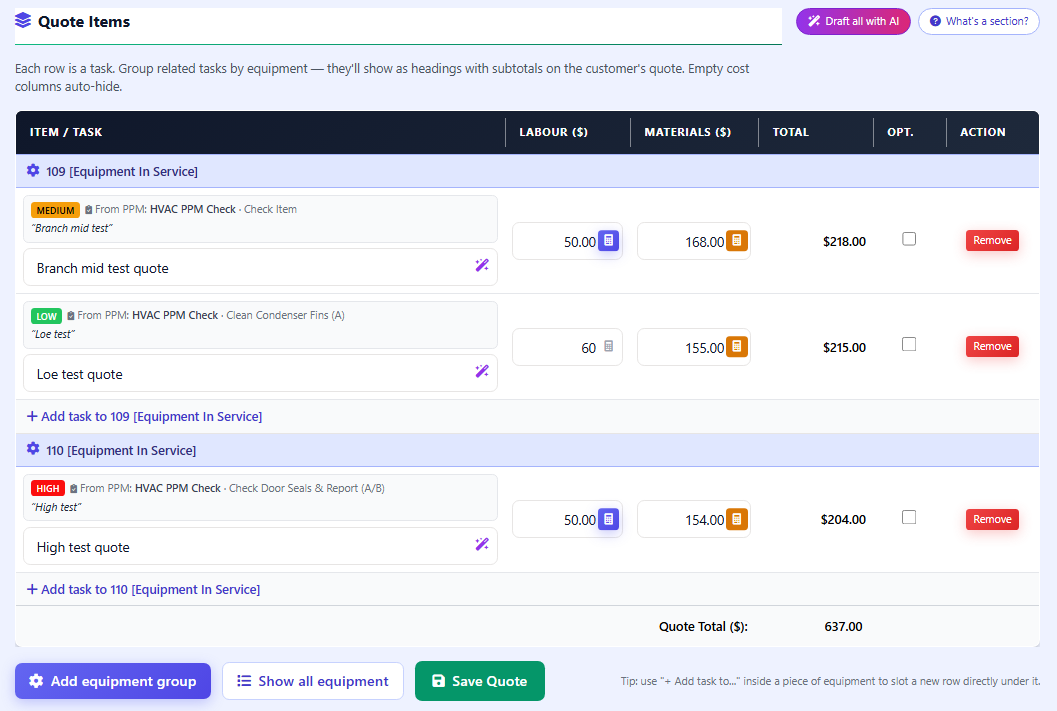
Group quote items by custom section (e.g. "Remedial Works") or by individual equipment. Each task is a single line of work with its own labor and materials.
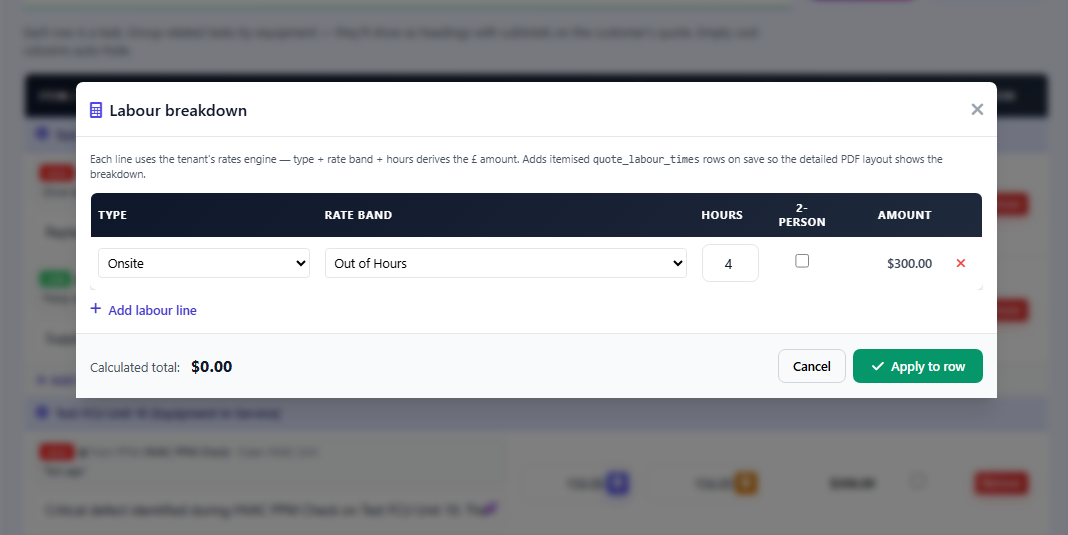
One click on a task's labor cell opens a popover with rate bands, labor types, hours, and 2-person toggle. Pricing pulls from your tenant's labor rate table — no manual math.
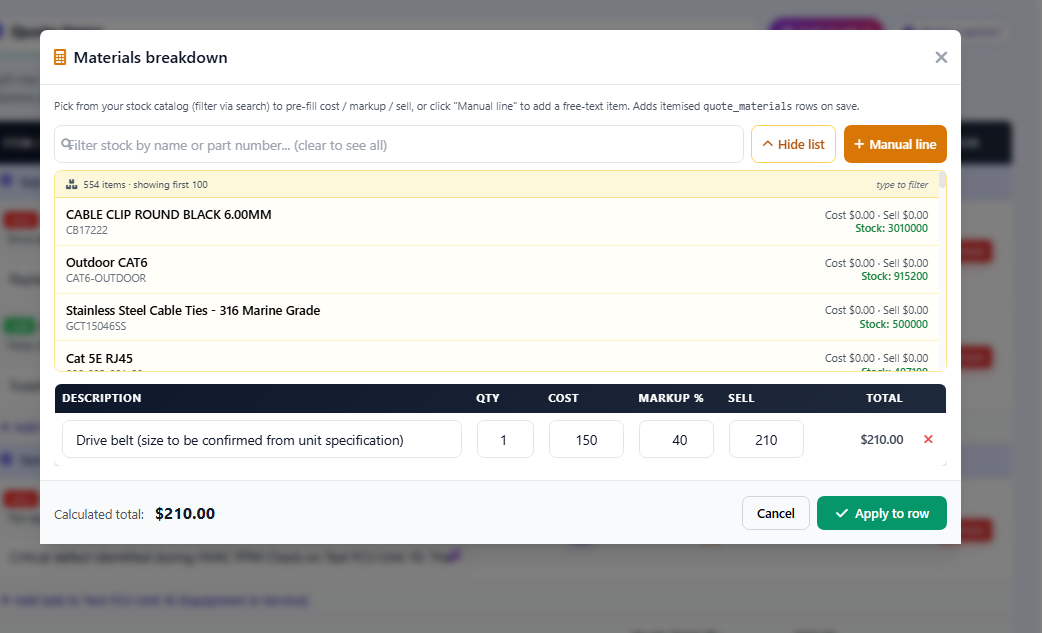
Browse and search your stock catalog inside the builder. Pick a part to pre-fill cost, markup percent, sell price and quantity. Manual lines are supported for items not yet stocked.
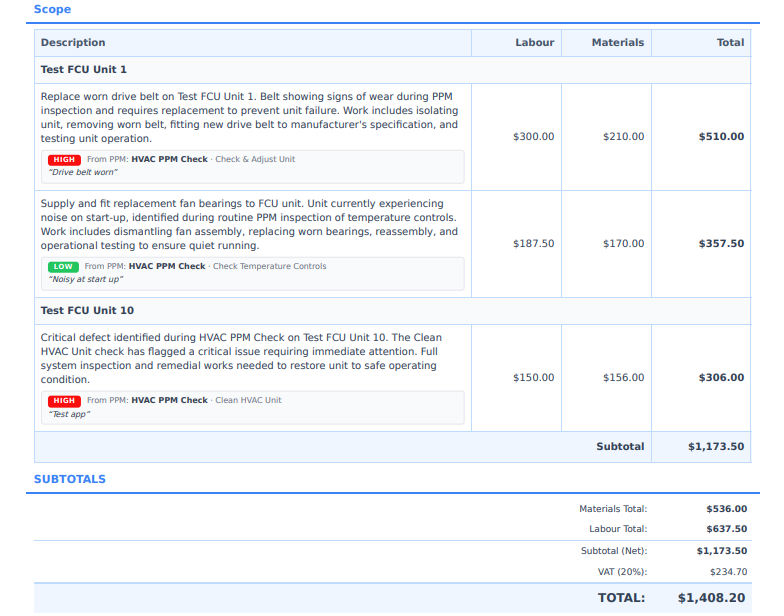
The customer-facing quote PDF renders the same sections and tasks with subtotals per section and a grand total. Empty cost columns auto-hide for a clean read.
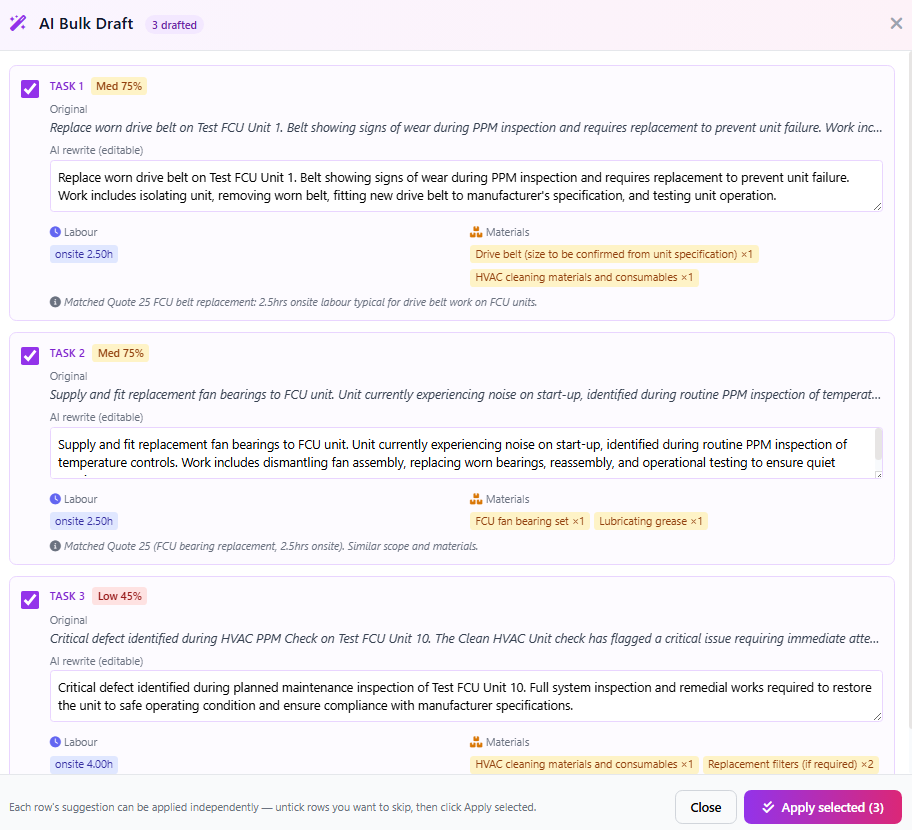
If you also need AI estimating, the AI plugs directly into the structured builder — drafting customer-friendly task wording, suggesting labor hours, and proposing materials, then dropping the suggestions into the same calculator infrastructure for human review and price refinement.
Commercial service work usually spans multiple assets. A boiler plant room visit might cover Boiler 1, Boiler 2, and the calorifier. An HVAC remediation might cover three air handlers and a chiller. Customers want to see what is being done at each piece of kit — not a single mass of line items.
This is especially valuable for HVAC contractors, preventive maintenance contractors, and any field service business quoting multi-asset jobs across customer sites.
Quoting labor as a flat dollar amount loses the detail that drives accurate billing. A structured quote breaks labor into discrete lines — type, rate band, hours, person count — and the calculator pulls the rate from your tenant's table so the office is never guessing.
The same calculator powers the work order and invoicing path, so the labor breakdown the customer sees on the quote is the same breakdown that ends up on the invoice.
Picking parts from a stored catalog is faster than retyping descriptions and prices for every quote. The materials calculator opens a stock catalog browser inside the builder — search by name or part number, click to add, and the cost, markup, sell, and quantity columns pre-fill from your stock record.
The materials breakdown is saved with the task and flows into the work order, the technician's mobile app, and the invoice. Pair with equipment asset tracking if you want stock movement tied back to specific equipment.
A structured quote is only useful if the customer sees the structure too. The customer-facing PDF renders sections as headings, tasks as line items underneath each, per-section subtotals, and the grand total — so the customer can sign off on a clear scope rather than a wall of items they have to interpret.
That end-to-end consistency is what reduces customer queries on the invoice. They paid for what was on the quote, and the invoice shows it back to them in the same shape they signed off on.
The biggest payoff of a structured quote is what happens after the customer accepts. Tasks carry through into the work order automatically, technicians complete them in the mobile app, and the invoice breakdown mirrors the same sections — so the office is not rebuilding the scope at every stage of the workflow.
This connects directly to job task management, where each accepted quote task becomes a tickable item on the work order. When the technician completes a task on the mobile app, the structure stays attached so the invoice can group lines back into the same sections.
If the original task came from a PM defect, completing the task automatically resolves the defect — closing the lifecycle from inspection to remediation.
This page is for U.S. service contractors who quote multi-asset or multi-area jobs and want the customer, the office, and the field team all looking at the same shape of work.
The wider buying context sits on the page for field service software for small business.
A structured quote organizes the work into sections and tasks instead of a flat list of line items. Each task carries its own labor and materials, each section rolls up to a subtotal, and the customer sees a clear scope of work that maps cleanly to a work order and an invoice.
It makes the customer's decision easier — they see what is being done at each piece of equipment and what each piece of work costs. It also eliminates rebuilding the same scope twice when the quote becomes a work order, because tasks carry through automatically.
Yes. Group tasks by custom section (e.g. AHU 1 Remedials, Boiler Room Works) or by equipment (e.g. Boiler 1, Boiler 2). Each group renders as a heading on the customer-facing quote with its own subtotal.
Click the calculator icon on a task's labor cell to open a popover. Pick a labor type (callout, travel, onsite), pick a rate band (Standard, Out of Hours, Weekend), enter hours, tick 2-person if needed. The amount calculates from your tenant's labor rate table — no manual math.
Yes. The materials calculator on each task includes a stock catalog browser with search. Pick a part to pre-fill cost, markup percent, sell price and quantity. Manual lines are supported for items not yet in the catalog.
Yes. The customer-facing quote PDF renders the same section and task structure with subtotals per section and a grand total. The same structure is preserved on the work order, the technician's mobile app, and the final invoice.
Yes. AI quote generation drafts each task's wording, suggests labor hours, and proposes materials, then drops the suggestions into the structured builder for human review. You refine prices via the calculator popovers before sending.
Field Ascend publishes U.S. pricing at $13 per user per month with all features included, no per-tech pricing, and a 30-day free trial. See pricing for the live plan.
Stop rebuilding the same scope twice. Build a structured quote once, watch it carry through to the work order, the technician's mobile app, and the final invoice — with the same shape the customer signed off on.
Start your free 30-day trial