Job Task Tracking

Job task management software for field service teams

Last updated: May 4, 2026

What is job task management software? Job task management software breaks a work order into discrete tasks — each one a single piece of work with its own scope, labor and materials, completion notes, and audit trail. Instead of one big job description, the technician sees a tickable checklist they can complete one task at a time, the office sees real progress, and the invoice can be grouped by exactly the same tasks the customer signed off on the quote.

This is the workflow most contractor work order software stops short of. Tasks are usually a free-text scope field, completion is a single "Mark complete" button, and the invoice has no relationship to the structure of the original quote. Field Ascend treats tasks as first-class data objects with full lineage from quote → work order → mobile app → invoice.

Pair this page with work order management software, the structured quote builder, and the technician mobile app for the full quote-to-cash flow.
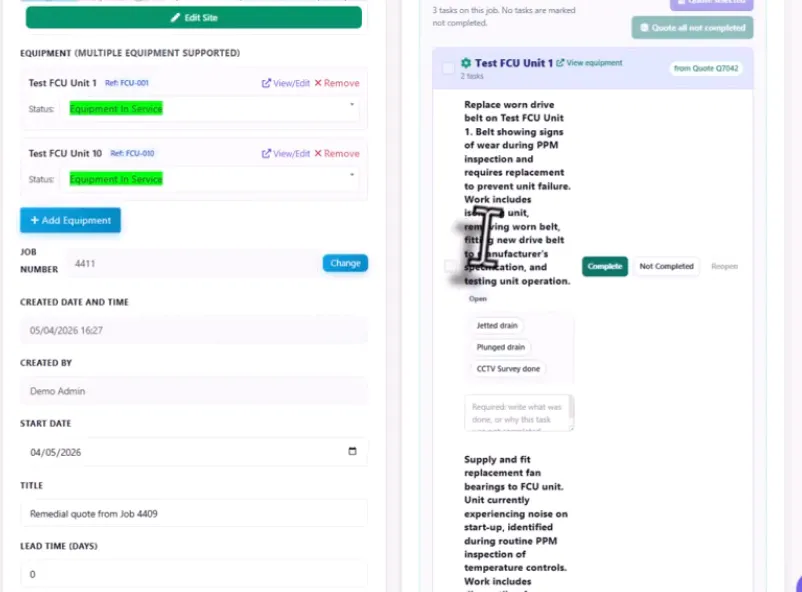
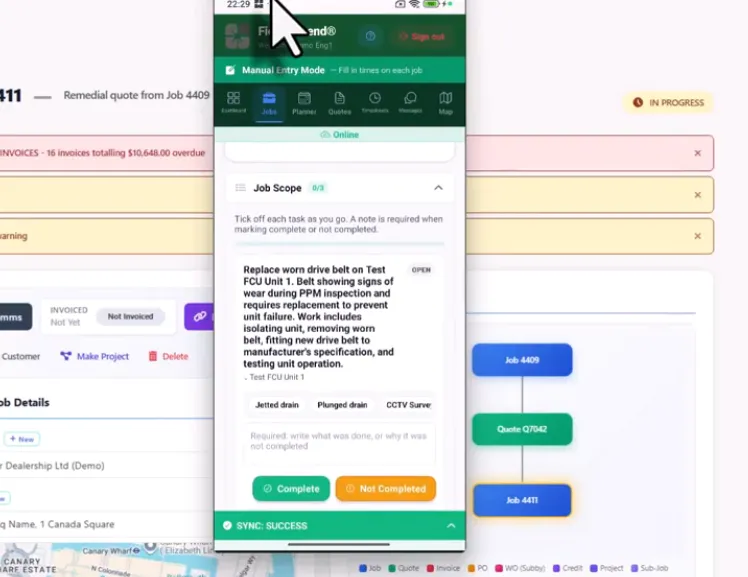
Work order Job Scope card showing a checklist of tasks grouped by section with completed tasks ticked and pending tasks awaiting technician action

Watch the job task workflow end-to-end

See how Field Ascend carries accepted quote tasks into the work order, how technicians complete each task on mobile, and how every action is tracked through to invoicing with a full completion audit trail.
Why most work order software treats scope as a text field

Open most field service management systems and the work order's scope is usually a single description box. The office types or pastes the scope, the technician reads it on the mobile app, and the only completion control is a "Mark complete" button at the bottom. There's no way to track which parts of the scope are done and which aren't, no way to enforce that all the work was actually completed, and no way to invoice in the same shape as the quote.

That works for a single-task callout. It breaks down on multi-task jobs — remediation work from a PM visit, a quoted scope with five tasks across three pieces of equipment, an installation with a setup task, a commissioning task, and a customer walkthrough. Each of those needs its own status, its own completion note, and its own audit trail.

Workflow stage Scope-as-text work order software Field Ascend job task management
Quote becomes a work order Scope is re-typed or pasted into a description field Quote tasks copy through to the work order automatically
Technician starts the visit Reads one big block of text Sees a tickable checklist with sections and tasks
Mid-visit progress Office has no idea what's done vs pending Office sees per-task status update in real time
Visit closes with unfinished work "Mark complete" button — done or not done Per-task complete or "Not Completed" with reason
Invoice goes out Flat list of labor and materials, no scope mapping Breakdown grouped by section and task — same shape as the quote

The structural difference is that tasks are a separate data layer underneath the work order. Each task carries its own status, its own completion record, and its own lineage back to the original quote and forward to the invoice. The office and the technician are looking at the same shape of work — and so is the customer when the invoice arrives.

What proper job task management software has to do

Tasks carry from quote to work order

Quote tasks copy automatically into the work order on acceptance — section grouping, task wording, labor and materials breakdown all preserved. Office never re-types scope.

Tap-to-complete on mobile

The Job Scope card on the technician mobile app lists every task with a tap-to-complete control. Notes modal opens with quick phrase chips for fast input.

Force completion enforcement

Optional tenant setting blocks the technician from closing the work order until every task is complete or marked Not Completed with a reason — no jobs closed with unfinished scope.

Invoice grouped by task

Invoice PDF includes a breakdown grouped by section and task — same shape as the original quote. Customers pay for what they signed off on, in the same structure.

If a task came from a PM defect, completing it auto-resolves the linked deficiency too — closing the lifecycle from inspection to remediation in a single tap.

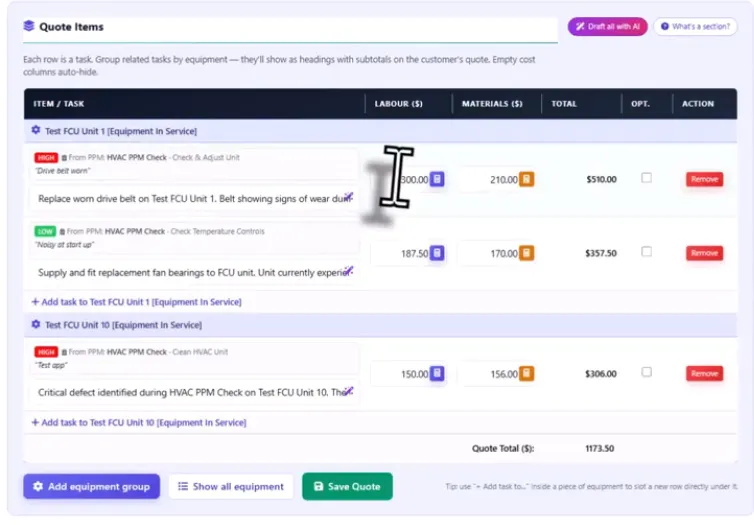
Quote tasks carry through to the work order

The single biggest source of double-entry in contractor operations is rebuilding the scope after a quote is accepted. The office types or pastes the quoted scope into the work order, the technician reads it, and the same wording shows up two or three times across different documents. Field Ascend ends that — when a structured quote is accepted, every quote task copies into the work order as a job task automatically.

  • Section/equipment grouping preserved (AHU 1 stays as AHU 1)
  • Task wording preserved exactly as the customer signed off
  • Labor and materials breakdown attached to each task
  • Defect link preserved when the task came from a PM defect
  • Quote ID + quote task ID stored for full lineage

The technician sees the same scope the customer agreed to. The office never has to retype anything. And when the invoice runs, the same task structure is preserved end to end — see the structured quote builder for the upstream shape.

Side-by-side panel showing quote with sections and tasks on the left and matching work order checklist on the right with arrow showing automatic carry-through

Tap-to-complete with quick phrases on the mobile app

The Job Scope card on the Field Ascend technician mobile app lists every task on the work order. Each task has a tap-to-complete control that opens a completion notes modal — but the standout feature is quick phrases. Tenants pre-define common completion notes ("Replaced and tested OK", "Site left clean", "Customer informed of recommendations") which appear as one-tap chips so technicians can build standard notes in seconds without typing.

  • One-tap completion with required notes (configurable)
  • Tenant-defined quick phrases — Drainage / HVAC / Electrical / Plumbing / Refrigeration / Generic packs
  • Personal phrases per technician (their own shortcuts, app-only)
  • Configurable separator (comma, newline, bullets)
  • Completion stamps technician name + timestamp + notes
  • Photos can be attached at task level, not just job level
  • Works fully offline — syncs when signal returns

This is one of those features that sounds small but transforms the field experience. Technicians stop hating completion notes and start writing better ones, because tapping is faster than typing on a job site.

Technician mobile app tap-to-complete modal showing task title completion notes textarea and quick phrase chips Replaced and tested OK Site left clean visible underneath

Audit trail, reopen flow, and force-completion

Every task carries a completion record. Who completed it, when, what they wrote in the notes, whether it was completed first time or reopened. The reopen flow is gated — admins can re-open a completed task with a reason, which writes another audit row. The "force task completion" tenant setting blocks the technician from closing the work order until every task is either complete or explicitly marked Not Completed (with a reason).

  • Completion stamps technician/admin name, role, timestamp, notes
  • Reopen flow with audited reason
  • Force-completion setting blocks job close with unfinished tasks
  • "Not Completed" status with required reason — for legitimate carry-overs
  • Per-task status visible to office in real time
  • Defect resolution cascade fires when the task is marked complete

For contractors operating under SLAs or compliance audits, this is non-negotiable. Every piece of work has a defensible record of who did it, when, and what they wrote about it.

Audit trail card showing per task completion who completed it timestamp notes and resolved defect link

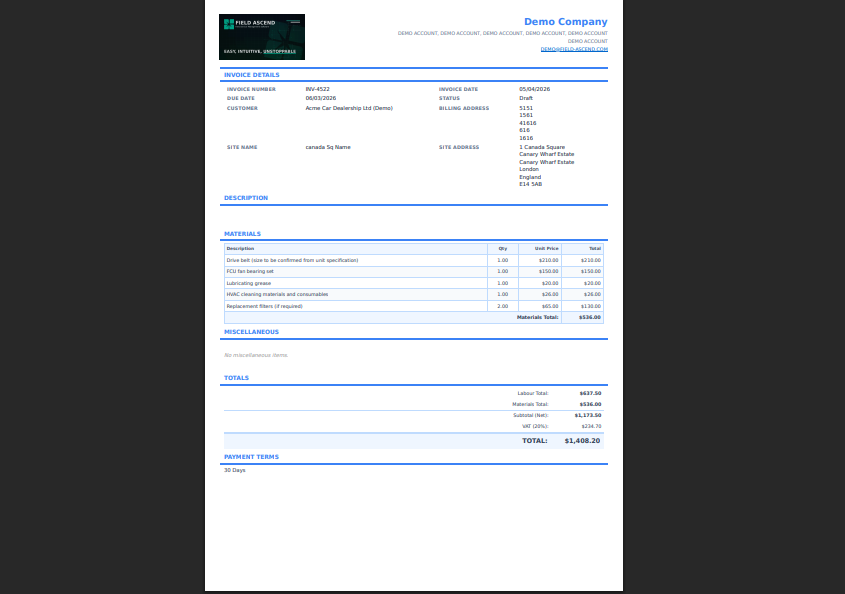
Invoice grouped by section and task

The biggest payoff of treating tasks as data is that the invoice can be grouped the same way the customer saw the quote. Field Ascend's invoice PDF includes a breakdown that mirrors the original quote structure — section headings, tasks indented under each, labor + materials per task, per-section subtotals, grand total. The customer reads the invoice and sees exactly the work they agreed to, in the same shape they agreed to it.

  • Sections preserved from quote → work order → invoice
  • Task titles denormalized onto invoice lines for immutable history
  • Per-section subtotals + grand total
  • Empty cost columns auto-hide for a clean read
  • Invoice PDF auto-hides on legacy invoices with no task structure
  • Accounting integrations (QuickBooks, Xero, Sage) post one flat line per row, unchanged

This dramatically reduces invoice queries — there are no surprise lines, because every line maps back to a task the customer signed off on. Pair with field service invoicing for the wider invoicing workflow.

Invoice PDF showing grouped breakdown sections at top tasks indented underneath each section per-section subtotals and grand total matching original quote structure

Where job task management connects to the rest of the workflow

Tasks are the spine that holds the contractor workflow together. They originate on a quote (structured quote builder), they execute on a work order (technician mobile app + Job Scope card), and they finalize on an invoice (grouped breakdown). They also cascade — completing a task can resolve the linked PM defect, mark a recurring maintenance visit complete, or stamp a compliance record.

Ad-hoc tasks can be added to any work order at any point — useful when a job uncovers extra scope mid-visit (a part needs replacing that wasn't quoted, or the customer asks for an add-on while the technician is on site). New tasks can be grouped under an existing section, a new custom section, or a piece of equipment on the site.

For multi-engineer jobs, tasks coordinate the team — each task can be marked complete by a different technician, and the audit trail captures which person did which piece of work.

Who this page is for

This page is for U.S. service contractors running multi-task jobs where scope coordination, completion tracking, and customer-quote-to-invoice traceability matter.

  • Commercial HVAC, plumbing, electrical, refrigeration contractors
  • PM and remediation contractors quoting follow-up works from defects
  • Installation contractors with multi-step scope (setup, commission, walkthrough)
  • Compliance contractors with audit-trail requirements
  • Multi-technician jobs where coordination and accountability matter

For wider buying context, see field service software for small business.

Frequently asked questions

What is job task management software?

Job task management software breaks a work order into discrete tasks — each one a single piece of work with its own scope, completion notes, and audit trail. Instead of one big job description, the technician sees a tickable checklist they can complete one task at a time.

How does the quote to work order task carry-through work?

When a structured quote is accepted, every quote task copies into the work order as a job task automatically — preserving the section/equipment grouping, the labor and materials breakdown, and the original task wording. The technician sees the same scope the customer signed off on.

Can technicians tap to complete tasks on the mobile app?

Yes. The Job Scope card on the mobile app lists every task. Each has a tap-to-complete control opening a notes modal with quick phrase chips for fast input. Completion stamps technician name, timestamp, and notes. Works offline; syncs when signal returns.

What are quick phrases?

Quick phrases are tenant-configurable canned text snippets — "Replaced and tested OK", "Site left clean", "Customer informed of recommendations". They appear as one-tap chips on the task completion modal so technicians build standard notes in seconds without typing.

Does completing a task resolve the original PM defect?

Yes. If the task came from a PM defect (via the bulk-quote workflow), completing the task auto-resolves the linked defect — sets status to resolved, stamps the closing work order ID and technician name, writes an event to the defect audit log.

Does the invoice show tasks grouped the same way?

Yes. The invoice PDF includes a breakdown grouped by the same sections and tasks the customer saw on the quote, with per-section subtotals and a grand total. Customers pay for what they signed off on, in the same shape.

Can tasks be added ad-hoc to a work order?

Yes. Office and technicians can add a new task to any work order at any time — useful when a job uncovers extra scope mid-visit. New tasks can be grouped under an existing section, a new custom section, or a piece of equipment on the site.

Can task completion be enforced before closing the work order?

Yes. The "force task completion" tenant setting blocks the technician from closing the work order until every task is marked complete (or marked Not Completed with a reason). This stops jobs being closed with unfinished scope.

How much does Field Ascend cost?

Field Ascend publishes U.S. pricing at $13 per user per month with all features included, no per-tech pricing, and a 30-day free trial. See pricing for the live plan.

Track scope as tasks, not as a wall of text

Carry quote tasks through to the work order, tap to complete on mobile with quick phrases, audit every step, and ship an invoice that mirrors the structure your customer signed off on.

Start your free 30-day trial