Field Ascend helps contractors run scheduling, dispatch, mobile work orders, route planning, PM scheduling and field updates from one connected system. Office teams can assign work with better technician, location and availability context while the field team receives clear work orders on mobile.
Built for growing service businesses that need practical dispatch control without a long enterprise rollout. U.S. pricing starts from approximately $13/user/month.
Built for the office-to-field rhythm of commercial service teams.
What is scheduling and dispatch software? Scheduling and dispatch software is a live system for booking work orders, assigning technicians, managing route changes, and keeping the office and field aligned. For a commercial contractor, it replaces whiteboards and spreadsheets with one dispatch board that shows who is available, where they are going, what the customer needs, and whether the work is moving on time.
If you are comparing dispatch as part of a wider platform decision, use the field service software buyer guide to check scheduling, mobile work orders, quotes, invoices, maintenance and reporting together.
Field Ascend is not a lightweight appointment calendar for a sole operator. It is built for service businesses with dispatchers, technicians, recurring commercial contracts, customer sites, equipment history, and work orders that need to come back invoice-ready.
Dispatchers, managers, estimators, and technicians all work from the same operational record. The office schedules and reprioritizes. The technician sees the work order, site notes, and next action.
Commercial contractors need customer sites, equipment, planned maintenance, call-ahead notes, purchase orders, status visibility, and proof of work. Dispatch has to connect to that full workflow.
The goal is simple: serious field service management software without an enterprise contract that punishes every new technician you hire.
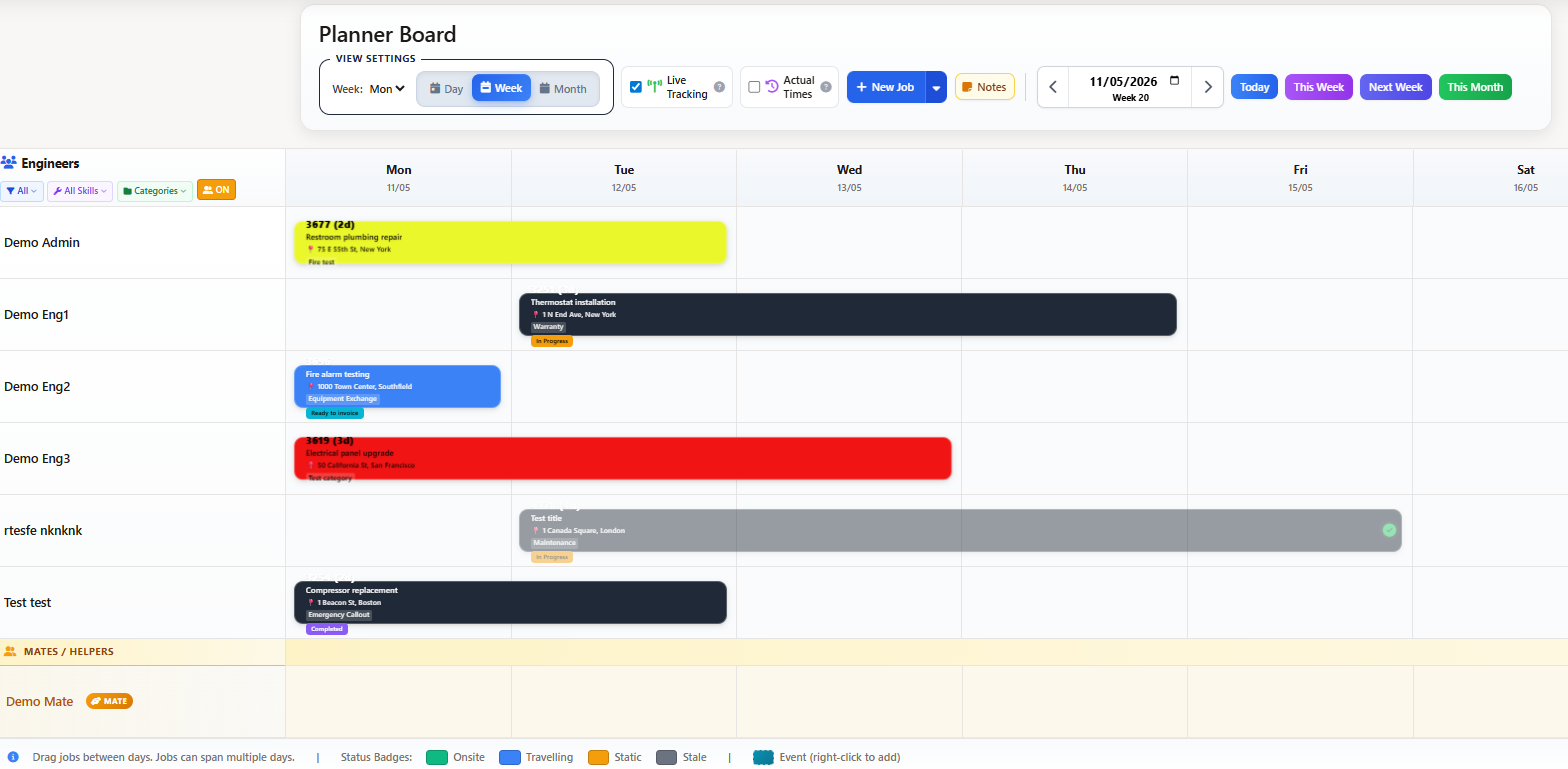
Dispatchers need speed, but they also need judgment. Field Ascend gives the office a visual planner where work orders can be moved between technicians, adjusted by time, and reviewed against daily capacity before the schedule becomes a mess.
Use the board to spot overload, fill gaps, rebalance urgent work, and keep the crew moving without rebuilding the day from scratch. For rules-based assignment of repeatable work, see dispatch software with auto-assignment. When you need the bigger platform context, connect dispatch with work order management software so every schedule change stays tied to the work order record.
Drag-and-drop scheduling and dispatch board for commercial work orders.
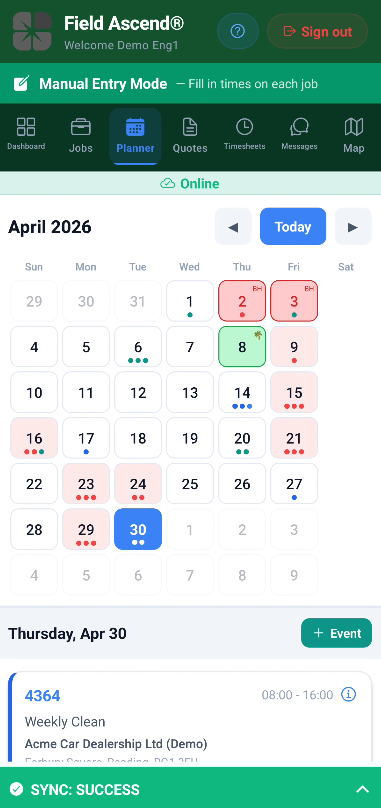
Technicians see the work order details they need in the truck.
A dispatch board only works if the field sees the same truth. The Field Ascend mobile app gives technicians their assigned work orders, site details, customer contacts, notes, photos, signatures, materials, timesheets, and next actions without forcing them to call the office for every detail.
When the office moves a work order, the technician gets the latest context. When the technician updates progress, the office sees the status. That loop is what turns dispatch from a whiteboard into an operating system.
Commercial technicians work in mechanical rooms, basements, rooftops, and sites with poor cell signal. Field Ascend is designed around mobile field work, not just a desktop planner.
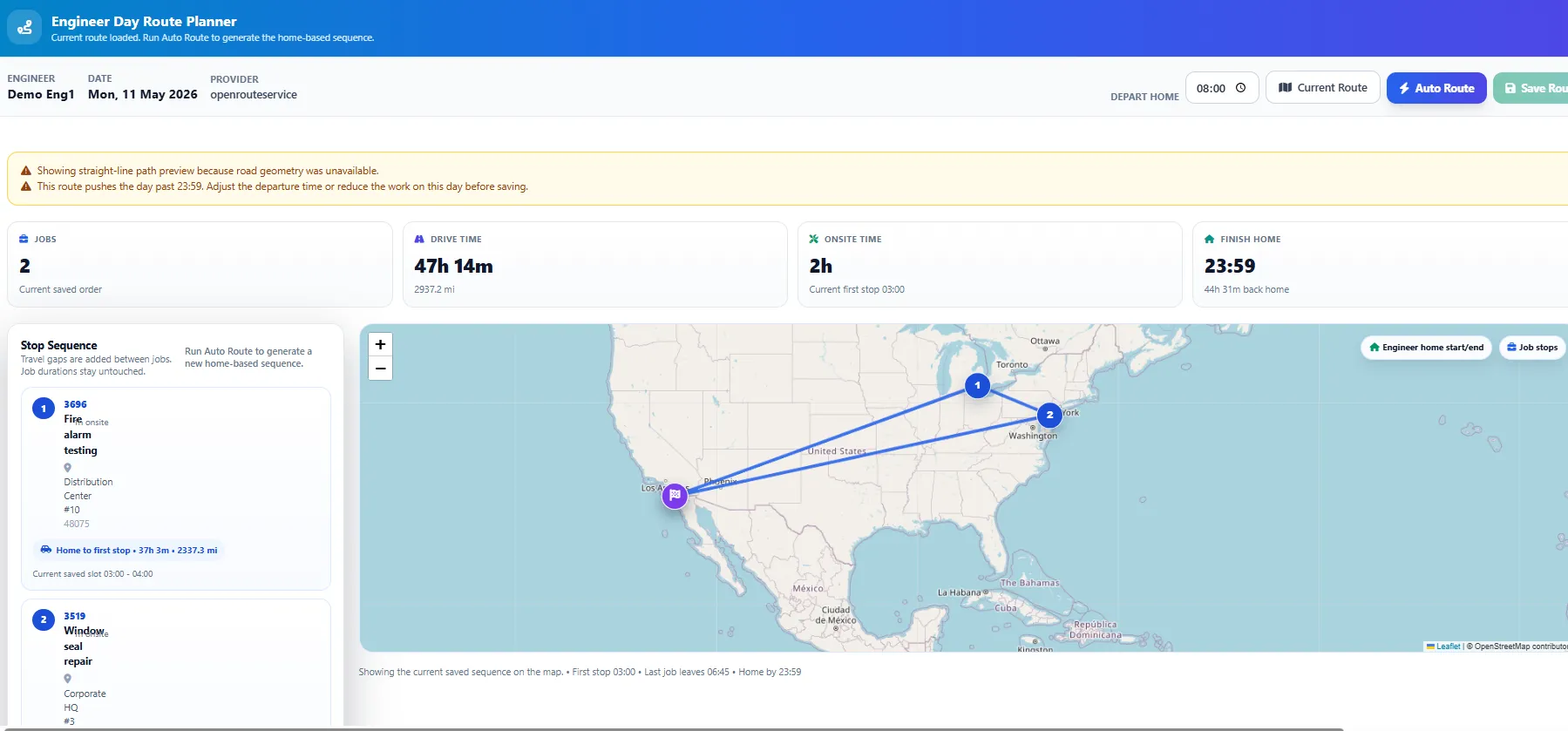
Drive time is not a small leak. It is a daily capacity problem. Field Ascend gives dispatchers map-based visibility so they can understand where work sits, which technician is nearby, and how route order affects the day.
This matters most for commercial contractors who cover a metro area with multiple technicians. Reducing one wasted hour per tech per week across a 10-tech crew gives back 520 hours a year. That is the difference between a busy team and a profitable team.
GPS and route optimization help dispatch reduce non-billable windshield time.
Your office and technicians already live in Google Calendar, Outlook, or Apple Calendar. Field Ascend publishes a secure calendar feed they subscribe to once, so scheduled work orders and non-job events show up in the calendar they already check. It is one-way and read-only, so the dispatch board stays the single source of truth.
Share one master company calendar for the whole operation, or give each technician and staff member their own feed showing only their assigned work orders and events.
Scheduled work orders and planner events (training, PTO, meetings, site surveys) appear side by side, with site address, customer, and status in the event detail.
Every event is anchored to your account time zone and published in UTC, so each work order shows at the right local time wherever your crew is, with daylight saving handled automatically.
Each feed is protected by a long, random link. Turn sync on in planner settings, paste the link into Google or Outlook, and reset any link instantly if it is ever shared by mistake.
Reschedule a work order in the office and the change flows through to subscribed calendars on their next refresh, with no manual re-exporting or stale spreadsheets.
Decide what shows in each event, from site address and customer name to job status and notes, so calendars carry exactly what your team needs.
Real dispatch is more than dropping work orders on a grid. Field Ascend plans routes, two-person work, time off, and day structure so your board reflects what is actually happening in the field. Pair it with AI and automation to take more admin off your dispatchers.
Review a technician's stops for the day and let Field Ascend suggest an efficient order based on location and travel, cutting windshield time and fitting in more billable work.
Split the day into sections like AM/PM or morning, afternoon, and evening, and shade working hours on the board so the crew plans around how your business really runs.
Schedule helpers and apprentices alongside your lead technicians with their own rows, so two-person work orders are planned and visible without double-booking.
Drop non-job events straight onto the board, from training and truck service to meetings and site surveys, so time that is not a work order is still accounted for.
Approved PTO and time off appear on the board, and U.S. public holidays can import automatically, so dispatchers never book work into days a technician is unavailable.
Control how far ahead technicians can see their own schedule in the mobile app, so plans stay flexible in the office while the field sees what is confirmed.
Preventive maintenance revenue depends on showing up when the contract says you will. Field Ascend connects dispatch with recurring visits, equipment service history, and the wider CMMS software workflow so planned work stays visible even when emergency calls hit the board.
Create preventive maintenance schedules and turn upcoming visits into work orders your office can plan around.
Give technicians the asset history, site notes, and required checks before they arrive.
Keep overdue PM work visible so urgent calls do not quietly bury contract obligations.
Many commercial contractors need strong scheduling and dispatch without a long implementation or unpredictable add-on costs. Field Ascend keeps the core FSM workflow clear, practical and affordable.
That clarity matters because software cost should be easy to understand before you commit. See the current Field Ascend pricing and check which scheduling, mobile, PM and invoicing features are included.
Public review volume is still early, so the source details are shown in crawlable plain HTML and should be refreshed when the profiles change.
Aggregate rating used in schema: 5.0/5 from 3 third-party reviews across Capterra, G2, and GetApp. Last checked: April 30, 2026.
Average rating: 5.0/5
Review count: 1
Last checked: April 30, 2026
Average rating: 5.0/5
Review count: 1
Last checked: April 30, 2026
Scheduling and dispatch software helps contractors book work orders, assign technicians, manage routes, update schedules, and keep the office and field working from one live system.
The best fit depends on your operation, but commercial contractors should look for a connected system with dispatch, work orders, mobile technician workflows, GPS, PM scheduling, and pricing that scales sensibly.
Yes. HVAC contractors can use Field Ascend for service calls, preventive maintenance, equipment history, technician assignment, mobile work orders, and dispatch visibility.
Yes. Dispatchers can use the visual board to reassign work, fill gaps, react to urgent calls, and keep technician schedules clear.
Yes. Technicians can see assigned work orders, customer and site details, map context, notes, photos, materials, signatures, and time entries from the mobile app.
Better route planning reduces non-billable drive time. Even one hour saved per technician per week can return hundreds of productive hours per year for a 10-tech contractor.
Yes. Field Ascend supports recurring preventive maintenance visits, equipment-linked service history, and dispatch visibility for planned commercial work.
Yes. Field Ascend publishes a secure calendar feed your office and technicians subscribe to in Google Calendar, Outlook, or Apple Calendar. Share a master company calendar or one per technician. Work orders and planner events both appear, the feed is read-only, and office changes flow through automatically.
Yes. Events are anchored to your account time zone and published in UTC, so each work order shows at the correct local time for the person viewing it, with daylight saving handled automatically.
Yes. Helpers and second technicians can be scheduled alongside your lead techs. Approved PTO and time off show on the board, and U.S. public holidays can import automatically so you never book work into a day a tech is off.
Yes. Route-day optimization reviews a technician's stops for the day and suggests an efficient order based on location and travel to cut drive time.
Field Ascend publishes U.S. pricing from approximately $13/user/month. A 10-user team is about $1,560 per year, with scheduling, dispatch, mobile work orders, PM scheduling and invoicing included in the wider platform.
Start your 30-day free trial, compare the math, or talk through the dispatch workflow with the team.