Visual stage management

Field Service Kanban Board Software

Field Ascend gives contractors visual workflow boards for service operations, including jobs, quotes, and tickets where those modules are used. Teams can manage records by status, category, priority, assignment, and stage instead of scanning long lists all day.

For office teams, Kanban is the operational view: what is new, what is scheduled, what is waiting, what is in progress, and what is ready for completion or billing.

$13/user/month. All features included. 30-day trial.

Workflow snapshot

JobsBy status
QuotesBy stage
TicketsBy priority
Board viewVisual flow

Statuses, categories, priorities, and colors are tenant-configurable lookup data, so the board can reflect how your company actually works.

What is field service kanban board?

A field service Kanban board groups operational records into columns so teams can see flow at a glance. Field Ascend already stores configurable job statuses, job categories, ticket statuses, ticket categories, ticket priorities, quote statuses, and quote categories.

That structure makes Kanban useful for real service work, not just generic task cards. A dispatcher can triage work orders, a manager can monitor bottlenecks, and a finance user can see what is complete enough to invoice.

How does a Kanban board help field service teams?

A Kanban board makes workflow stage visible. It helps teams act on stuck work before it becomes a customer problem.

Job status columns

Group work orders by custom statuses such as new, scheduled, in progress, awaiting parts, complete, or invoicing.

Quote pipeline visibility

Use quote statuses and categories to see draft, sent, accepted, and follow-up work without a spreadsheet.

Ticket triage

Track support or customer tickets by status, priority, category, source, and assignment.

SLA and priority focus

Use priority and target completion context to keep urgent work from being buried in a list.

Assignment awareness

Show which technician or team owns the work and where reassignment may be needed.

Connected detail records

Open the full job, quote, or ticket when deeper notes, equipment, materials, invoices, or communication are needed.

What does visual stage management look like?

The Kanban board turns service workflow into a practical operating screen: statuses become columns, work orders become cards, and dispatchers can act without losing context.

Drag-and-drop job status columns

Configure statuses, categories, and priorities to match your service process. Jobs then appear in the correct workflow stage, from new requests and scheduled work through to completed jobs and billing handoff.

  • Custom columns based on your company's job statuses
  • Card count badges so bottlenecks stand out quickly
  • Status changes stay connected to the job detail record
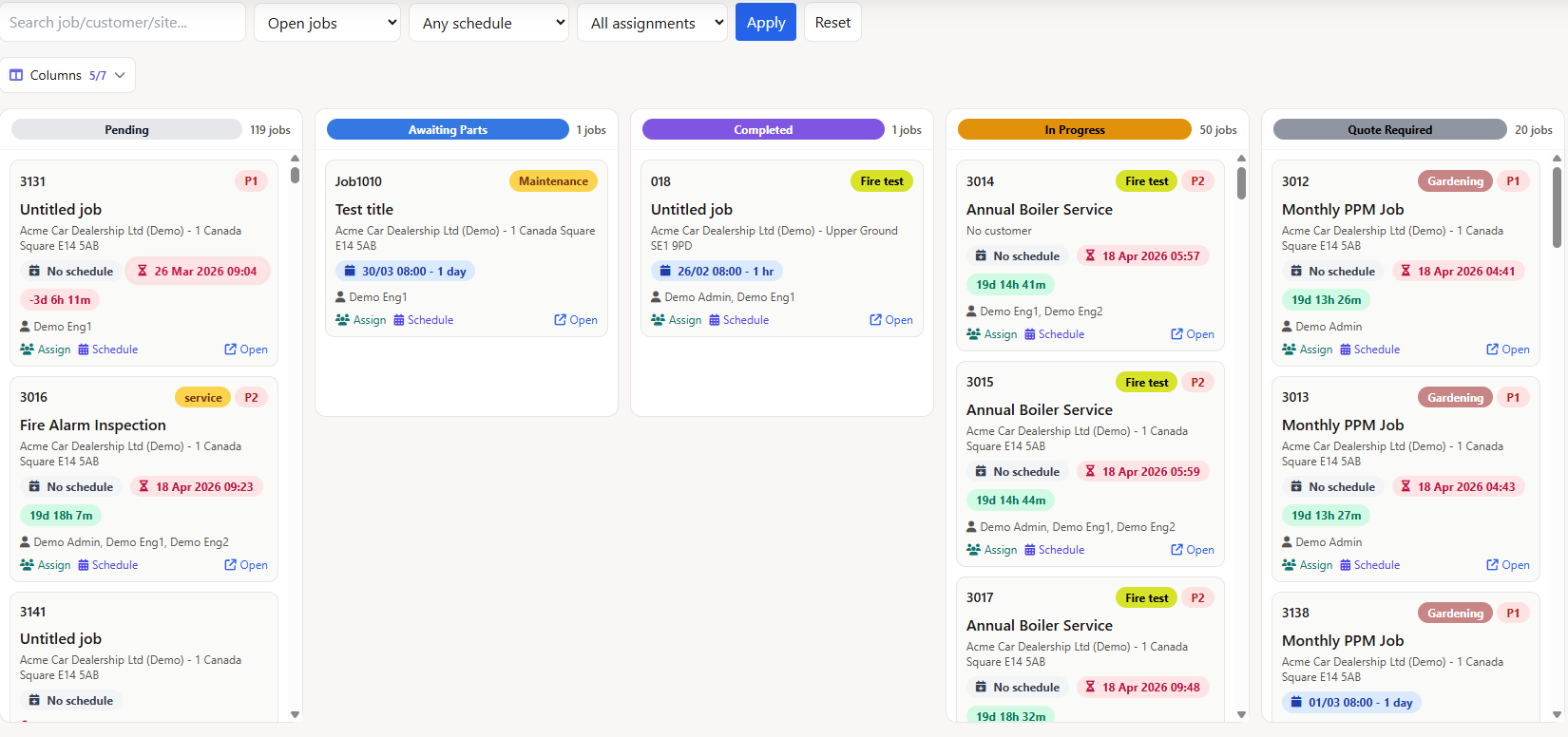
Field service Kanban board with drag-and-drop job status columns, card count badges, and column picker

Keep SLA and priority work visible

Office users can review overdue work, high-priority calls, and jobs at risk from the same visual board. Urgent items are easier to spot than they are in a long table or spreadsheet.

  • Live countdown context on job cards
  • Color-coded urgency for work that needs attention
  • Clearer triage for dispatchers and service managers
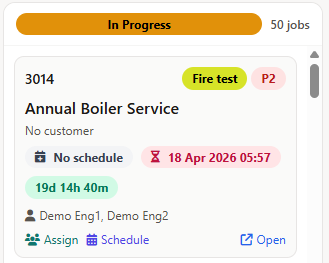
Kanban board job cards showing live SLA countdown timers in green, amber, and flashing red overdue states

Schedule without leaving the board

When a job needs time on the calendar, dispatchers can use the board as the starting point. Open the schedule view, choose dates and times, assign technicians, and keep the card aligned with the wider scheduling workflow.

  • Useful for fast triage during busy service days
  • Works alongside scheduling and dispatch views
  • Reduces jumping between screens for common updates
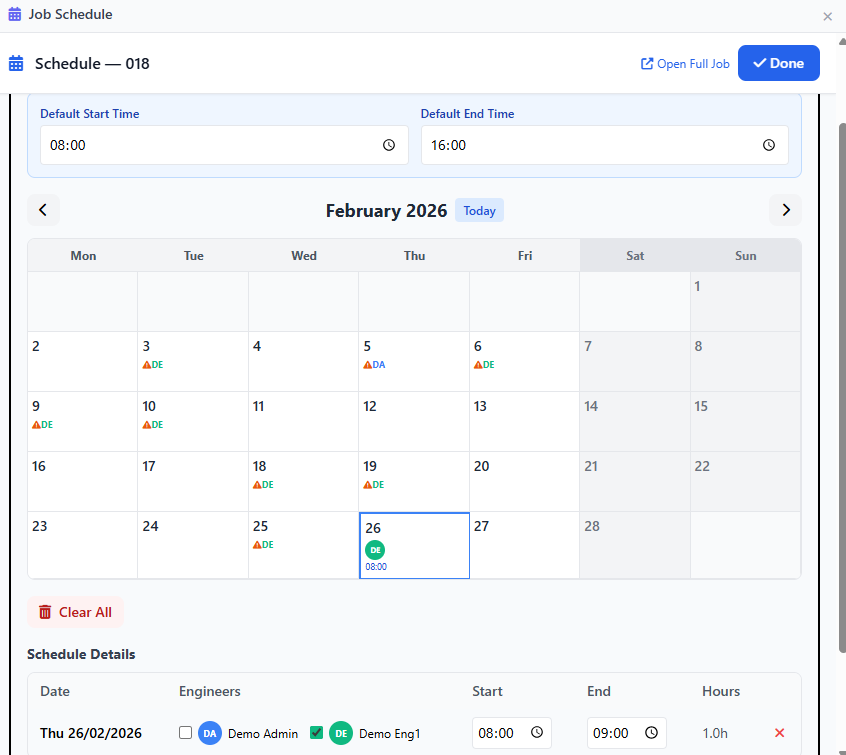
Inline schedule calendar modal on Kanban board showing date selection, start and end times, and technician assignment

See ownership and assignment at a glance

Each card keeps the responsible technician or team visible, so managers can see where work is sitting and who owns the next action. If a record changes stage, the related detail page, lists, and mobile workflow stay aligned.

  • Assignment awareness for dispatch and management
  • Cleaner handoffs between office and field teams
  • Quick access back to the full job when deeper detail is needed
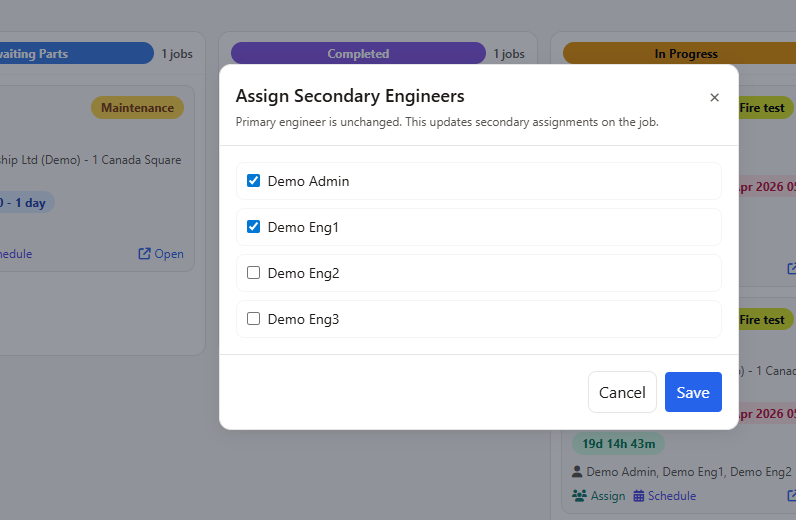
Kanban board technician assignment panel showing primary and secondary technician selection with notification

Who is the Kanban board for?

It is useful for contractors whose office team needs fast visual control over service flow.

Service managers

Spot too much work in awaiting parts, unscheduled, or ready-to-invoice stages.

Dispatchers

See which work orders need attention without opening every job record.

Admin and finance users

Find completed work, invoice blockers, quote follow-ups, and unresolved tickets faster.

Related Field Ascend Workflows

Explore connected U.S. product pages for dispatch, mobile work, work orders, dashboards, preventive maintenance, and pricing.

Independent Review Footprint

Public review volume is still early, so the review sources are shown in crawlable plain HTML and should be refreshed when profiles change.

Aggregate rating used in schema: 5.0/5 from 3 third-party reviews across Capterra, G2, and GetApp. Last checked: April 30, 2026.

Frequently Asked Questions

What is a field service Kanban board?

A field service Kanban board is a visual workflow view that groups jobs, quotes, or tickets by status so teams can see what stage each record is in.

Can Field Ascend use custom statuses?

Yes. Field Ascend uses tenant-configurable statuses, categories, priorities, and colors for jobs, quotes, and tickets where those modules apply.

Is Kanban only for jobs?

No. The same visual stage concept can apply to jobs, quotes, and tickets because each has its own status and category structure.

Does the Kanban board replace the jobs table?

No. It complements the jobs table. Use the board for stage management and the table for data-heavy filtering, bulk actions, and exports.

How much does Field Ascend cost?

Field Ascend pricing is $13/user/month. All features included. 30-day trial.

Track field service work visually

Try Field Ascend with full access to scheduling, dispatch, mobile work orders, GPS/location context, dashboards, Kanban workflows, preventive maintenance, invoicing, and the rest of the platform.