Online Quote Acceptance — No Portal Required
When you email a quote, Field Ascend embeds Accept, Decline, and Feedback buttons in the email. The customer clicks through to a secure, branded page showing the full quote summary, line items, and totals.
To accept, they enter their name and (optionally) a PO or order number. If the quote has optional extras, they tick the ones they want — the total recalculates live. The quote converts to a job immediately with all selected materials, pricing, and site details. Your team gets an instant email notification.
No customer account. No portal login. No friction. The link is time-limited and unique to that quote. Customers with a customer portal account can also accept through the portal — with the same optional item selection and PO capture. This is the core of what makes Field Ascend effective as quoting software for contractors.
AI-Assisted Quote Generation
Field Ascend's AI Quote Builder drafts quotes using your historical data. For example, if you've completed similar jobs before, the AI references your previous quotes and uploaded supplier price lists to suggest labour, materials, and markup.
It uses your actual labour rates from account settings. You can upload reference materials — CSV price lists, PDFs, spreadsheets — and the AI incorporates them into its suggestions.
You always review and edit before sending. The AI assists with the draft; you approve the final quote. Combined with online acceptance, this significantly shortens the path from customer enquiry to confirmed job. Quotes can also be created directly from the ticketing system — converting a customer enquiry into a professional quote with one click.
Quote Tracking and Acceptance Analytics
Know the status of every quote you send. Field Ascend tracks email opens, portal views, link clicks, and customer responses — all visible in a dedicated analytics dashboard.
See your acceptance rate, average response time, pipeline value awaiting response, conversion funnel, and the most common reasons customers decline. Use this data to adjust pricing, follow up at the right time, and improve your win rate.
On each quote's page, live status indicators show at a glance: whether the email was opened (with timestamp), how many times the quote was viewed on the portal, and the customer's response — including any PO number or feedback message.
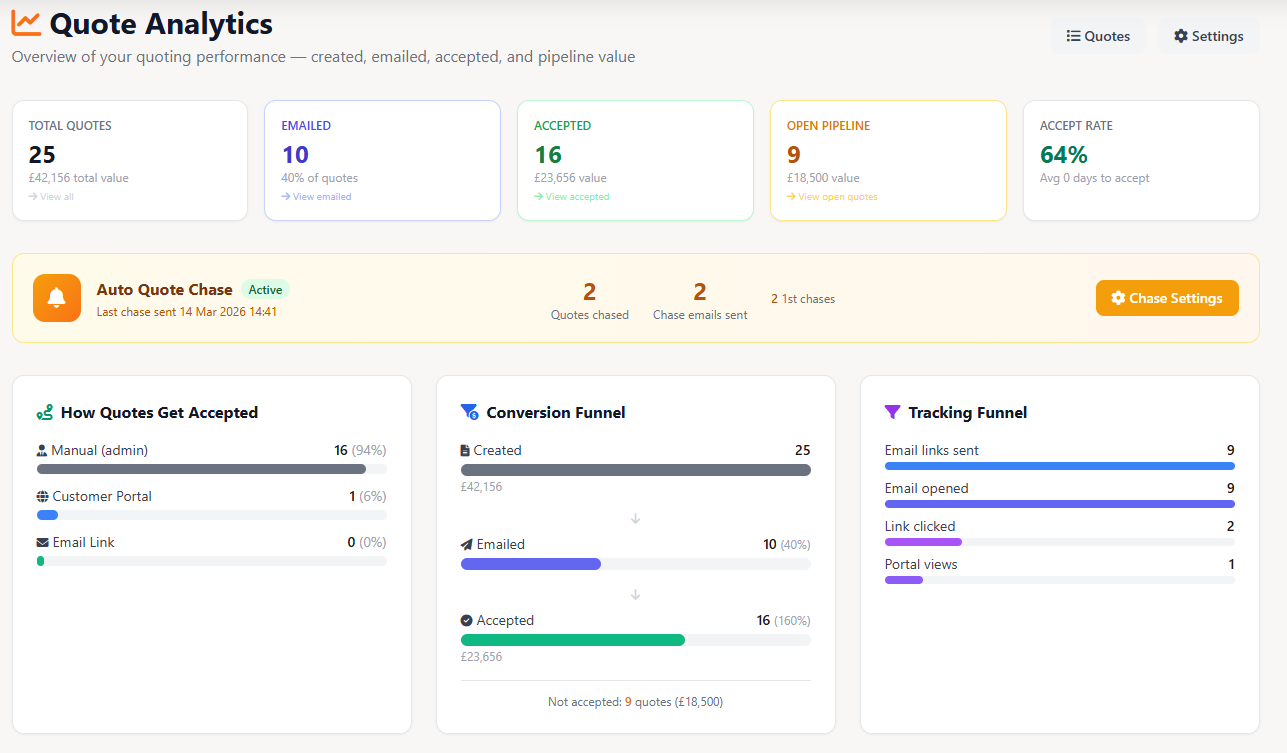
Auto Quote Chase — Stop Chasing Manually
Unanswered quotes cost you money. Field Ascend's Auto Quote Chase sends follow-up emails automatically when customers don't respond — so you never forget to follow up again.
You set the schedule: for example, 7 days after the original email, then 14 days later, then a final follow-up at 30 days. Each chase re-attaches the quote PDF and includes accept/decline buttons. The system stops chasing automatically when the customer accepts, declines, or the maximum number of follow-ups is reached.
Smart stop conditions let you skip the chase if the customer has already opened the email or viewed the quote on the portal — so you're not pestering engaged customers, just nudging the ones who haven't seen it yet. Set a maximum quote age to avoid chasing stale quotes from months ago.
Optional Line Items — Let Customers Choose
Not every line item on a quote is a must-have. With optional items, you can mark materials or miscellaneous line items as extras that the customer can choose to include or leave out.
When the customer accepts via the email link or customer portal, optional items appear with checkboxes. They tick the ones they want, the total recalculates live, and only the selected items carry across to the job. No back-and-forth emails about what's included.
If the customer accepts by phone or email, your admin can select the options on their behalf before creating the job. On the PDF, optional items are clearly labelled with base and maximum totals shown.
Drag-and-Drop PDF Template Designer
Design your own quote PDFs with a visual canvas editor. Drag and drop your logo, company details, terms and conditions, materials tables, labour breakdowns, and any other elements exactly where you want them.
Merge tags automatically populate quote-specific data — customer name, quote number, pricing, site address, valid-until date, and more. Embed uploaded images directly into the PDF with grid or full-page layouts and optional captions. Control table styling, column visibility, colours, and fonts. Assign different templates to different quote categories.
A simple mode is also available for quick setup — toggle sections on and off, reorder them, and let Field Ascend handle the layout. Both modes produce professional, print-ready PDF documents with your branding, images, and data.
Quote Valid-Until Date — Clear Expiry on Every Quote
Every quote gets a clear valid-until date, auto-calculated from your tenant default (e.g., 30 days). The date appears on the PDF, the customer portal, and the email acceptance page — so the customer always knows how long the price is valid.
Admin can override the date per quote. When the date passes, the acceptance link shows a clear expiry message asking the customer to get in touch for an updated quote. The auto chase system skips expired quotes automatically.
This replaces the generic "expires in X days" message with an actual calendar date — more professional, more transparent, and standard across every competitor in the market. Configure the default in your quote settings.
Estimator Forms — Quote from the Field
Send engineers or estimators on-site with custom forms built into the app. Capture measurements, specifications, photos, and customer signatures on the spot — then use the data to build a quote back in the office.
Estimator data flows directly into the quote and appears on the generated PDF. Include field photos, item breakdowns, and signed acknowledgements — all from a single site visit, all automatically linked to the quote record.
Designed for contractors who need to survey before quoting — fire protection, HVAC installations, lift modernisations, electrical upgrades, and any job where accurate pricing depends on what's actually on-site.
Two-Way Communication Timeline
Every quote has a full communication history — not just the emails you sent, but the customer's responses too. See sent emails, auto-chase follow-ups, email opens, link clicks, portal views, acceptances, declines, and feedback messages in one chronological timeline.
No more switching between tabs or checking multiple systems. The comms timeline on each quote gives your office team complete visibility of every interaction with the customer, so anyone on the team can pick up a conversation where it left off.
Audit-ready and tenant-scoped — every event is timestamped and attributed. Useful for disputes, customer service, and understanding exactly what happened on any quote at any point in time.