Xero, QuickBooks, Sage & FreeAgent Integration for Field Service

Connect your field service management software UK directly to Xero, QuickBooks, Sage (Accounting & 200), or FreeAgent. Post invoices in one click, sync payment statuses automatically, and eliminate duplicate data entry across your field service accounting integration.

Xero Integration Sage Integration QuickBooks FreeAgent Integration Zoho Books Integration

Watch: Connect Your Accounting Software in Minutes

This step-by-step tutorial shows you how to set up Xero integration for field service management (or QuickBooks/Sage) with automatic invoice syncing, account code mapping, and 2-way updates.

Complete setup guide for Xero, QuickBooks & Sage integration with Field Ascend

What Syncs Between Field Ascend and Your Accounting Platform?

This cloud-based accounting integration syncs the following data automatically between Field Ascend and Xero, QuickBooks, Sage, or FreeAgent:

  • Customers/contacts
  • Invoices (one-click posting)
  • Payment status (real-time sync back)
  • Automatically marks invoices paid from reverse sync
  • Tax/VAT rates (auto-mapped)
  • Nominal/ledger/account codes
  • Invoice numbering rules (forced or auto)

All synchronisation happens in real-time. Mark an invoice as paid in Xero? It updates in your dashboard instantly.

How Contractor Teams Use This Integration

Real workflows from UK field service businesses using Xero invoice integration and job management software Xero integration:

📱 Engineer Completes Job

Engineer finishes a job on the mobile app, marks it complete. Office admin posts the invoice to Xero in one click. Customer pays via Xero → payment status syncs back to Field Ascend automatically. No data re-entry.

📊 Office Posts in Bulk

Admin team reviews 20 completed jobs, selects all, posts invoices to QuickBooks in one batch. All invoices use the correct account codes and VAT rates pulled from QuickBooks. Takes 30 seconds instead of 2 hours of manual entry.

🔒 VAT Mapping Prevents Errors

Accountant configures VAT rate mapping once during setup. Every invoice posted to Sage Accounting or Sage 200 automatically applies the correct VAT rate and ledger codes. Payment status syncs back automatically—no manual checking required.

How the 2-Way Sync Actually Works

Field Ascend's accounting integration creates a continuous loop between your field operations and your financial records. Here's exactly what happens when you connect:

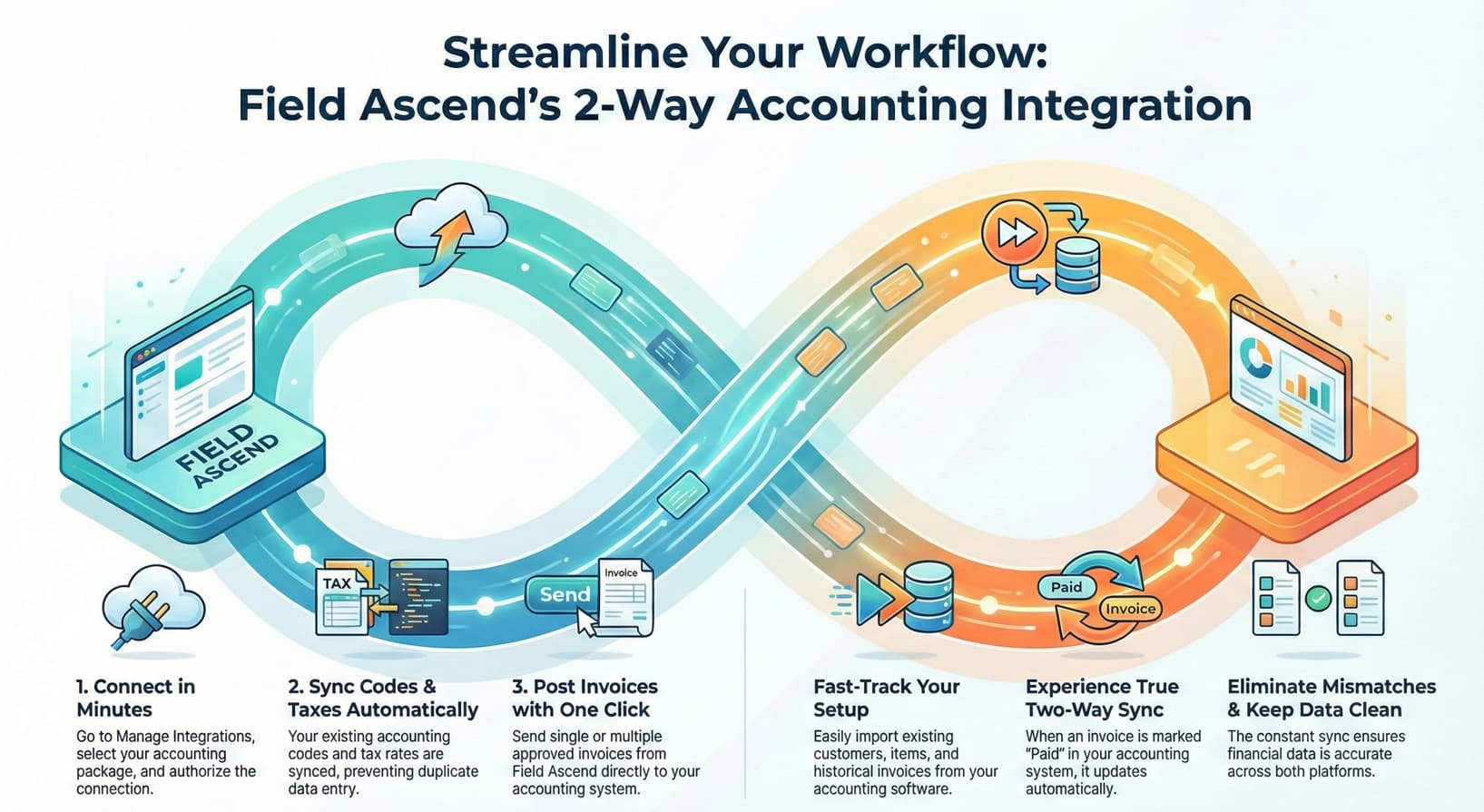
Field Ascend 2-Way Accounting Integration Workflow - Connect, Sync, Post Invoices, Import Data, Two-Way Sync, Eliminate Mismatches

Push to Accounting

1. Connect in Minutes

Go to Manage Integrations, select Xero, QuickBooks, Sage, or FreeAgent, and authorise the connection. No API keys, no technical setup—just click and approve.

2. Sync Codes & Taxes Automatically

Your existing account codes, nominal ledgers, and VAT rates import automatically. Map them once during setup—every future invoice uses the right codes without manual selection.

3. Post Invoices with One Click

Complete a job, generate an invoice, and post it directly to your accounting system. Post one at a time or batch-post 50 invoices in seconds. No CSV exports, no re-typing.

Pull from Accounting

4. Fast-Track Your Setup

Already have customers in Xero or QuickBooks? Import them directly into Field Ascend. Pull items, products, and even historical invoices to hit the ground running.

5. Experience True Two-Way Sync

When a customer pays an invoice in Xero, QuickBooks, Sage, or FreeAgent, the payment status updates automatically in Field Ascend. No more checking two systems—your dashboard always shows the truth.

6. Eliminate Mismatches & Keep Data Clean

The continuous sync ensures financial data stays accurate across both platforms. Month-end reconciliation becomes trivial when everything matches automatically.

💡 The result? Your field team focuses on jobs, your office team focuses on customers, and your accountant gets clean, accurate data without chasing paperwork.

Key Features: Accounting Integration for Field Service

Whether you use Xero, QuickBooks, Sage, or FreeAgent integration for field service, you get the same powerful features:

True 2-Way Synchronisation

Updates in Xero, QuickBooks, Sage, or FreeAgent automatically sync back to Field Ascend. Payment marked as received? Your team sees it instantly without checking two systems.

One-Click Invoice Posting

Post invoices from Field Ascend to your accounting platform with one click. No CSV exports, no manual re-typing, no spreadsheets.

Automatic Account Mapping

Field Ascend imports your chart of accounts automatically. Map once, apply forever. Every invoice uses the correct nominal codes.

Consistent Invoice Numbering

Force Field Ascend invoice numbers in your accounting system or use theirs. Either way, perfect numbering consistency for audit trails.

Customer Data Sync

Create a customer in Field Ascend, it appears in your accounting platform. Add one in QuickBooks or FreeAgent, it syncs to Field Ascend. One source of truth.

Real-Time Payment Status

See which invoices are paid, partially paid, or overdue without logging into your accounting software. Perfect for chase-up calls.

Field Ascend vs. Manual Accounting Entry

How contractor job management + accounts sync saves time compared to manual invoicing:

Task ❌ Manual Entry ✅ Field Ascend
Invoice Creation 15-20 mins per invoice 1 click (instant)
Data Entry Errors Common Zero errors
Payment Status Updates Manual checking daily Auto-sync (real-time)
Time Saved Per Week 0 hours 5-10 hours saved
Account Code Mapping Manual per invoice Automatic

Perfect for UK Field Service Contractors

Our Sage integration for field service (and Xero/QuickBooks) works across these UK industries. Also available as CAFM software UK for facilities managers:

Industries We Serve

Key Benefits

  • ✓ Save 5-10 hours per week on admin
  • ✓ Eliminate invoice data entry errors
  • ✓ Get paid faster with automatic reminders
  • ✓ Reduce month-end reconciliation time by 80%
  • ✓ Real-time cash flow visibility
  • ✓ MTD (Making Tax Digital) compliant
  • ✓ Audit-ready invoice numbering
  • ✓ VAT mapping prevents mistakes
  • ✓ Bank-grade security (OAuth 2.0)

Supported Accounting Platforms

Field Ascend integrates with the UK's most popular accounting platforms. All feature identical 2-way sync capabilities.

Sage users: We support both Sage Accounting (cloud, for small businesses) and Sage 200 (mid-market ERP). Full 2-way payment sync included.
FreeAgent: Popular with UK freelancers and small businesses. Full OAuth2 integration with 2-way sync.
Zoho Books: Part of the Zoho ecosystem. Full integration for businesses using Zoho CRM, Zoho Projects, and more.

Setup takes under 2 minutes. No technical knowledge required—just click "Connect" and authorise. View all integrations →

Frequently Asked Questions

How long does setup take?

Less than 2 minutes. Click "Connect", authorise the integration, and Field Ascend automatically imports your account codes and settings. No technical knowledge required.

What does "2-way sync" mean?

Changes in your accounting software automatically update Field Ascend. Mark an invoice as paid in Xero, QuickBooks, Sage, or FreeAgent? It updates in Field Ascend instantly. You never need to check both systems.

Can I edit an invoice after posting?

Yes. Edit the invoice in either Field Ascend or your accounting platform—changes sync automatically. However, best practice is to void and recreate if the invoice has already been sent to the customer.

Does this handle credit notes?

Yes. Create credit notes in Field Ascend and post them to Xero/QuickBooks/Sage in one click. They're automatically linked to the original invoice for clean audit trails.

How does VAT/tax mapping work?

During setup, you map Field Ascend tax rates (e.g., "Standard VAT") to your accounting platform's tax codes. Every invoice posted automatically uses the correct VAT rate—no manual selection needed.

Is my data secure?

Yes. We use OAuth 2.0 authentication (bank-grade security) and never store your accounting platform passwords. All data transfers are encrypted.

What happens to existing invoices?

The integration only affects new invoices posted after setup. Your existing invoices in Xero, QuickBooks, or Sage remain untouched.

Can I connect to multiple accounting platforms?

No, you connect to one platform at a time (Xero, QuickBooks, Sage, or FreeAgent). However, you can disconnect and reconnect to a different platform whenever needed.

Which Sage products do you support?

We support Sage Accounting (formerly Sage One/Sage Business Cloud Accounting) for small businesses, and Sage 200 for mid-market companies. Both include full 2-way sync with automatic payment status updates.

Does this work with Making Tax Digital (MTD)?

Yes. Since Field Ascend posts invoices directly to your accounting platform, all MTD requirements are handled by Xero/QuickBooks/Sage as normal.

Stop Double-Entering Invoices

Join hundreds of UK contractors saving 5-10 hours per week with seamless accounting integration. Try Field Ascend free for 30 days.

Start Free 30-Day Trial Book a Demo

Setup in under 5 minutes • Cancel anytime • No long-term contract