Talk to Your Field Service Data with Claude AI

The UK's first native Claude AI connector for field service management.

Connect your Field Ascend account to Claude AI and ask questions about jobs, equipment, customers, certificates, and PPM contracts — in plain English. No dashboards to navigate, no reports to build. Just ask.

Field Ascend's AI Connector uses Anthropic's Model Context Protocol (MCP) to give Claude secure, read-only access to your live field service data. It works on Claude web, desktop, and mobile — delivering instant data insights via the Claude AI connector wherever you are.

Works on Claude.ai · Claude Desktop · Claude Mobile

How It Works

Three steps to turn Claude into your conversational field service assistant. No API knowledge required — if you can type a question, you can use it.

1

Connect

Add the Field Ascend MCP server in Claude. You'll be prompted to log in with your admin credentials via a secure OAuth 2.1 flow — one click and you're connected.

2

Ask

Type any question in plain English: "Show me all overdue jobs", "Which engineer completed the most jobs this month?", or "Get the details for job #4521".

3

Get Answers

Claude queries your live Field Ascend data using 12 read-only tools and returns clear, actionable answers — with context, summaries, and specific details from your system.

Ask Your Business Anything

Forget navigating dashboards or building reports. With Field Ascend's AI Connector, you type a question and get a direct answer from your live data. Here's what real conversations look like — delivering genuine Claude-powered reporting for field service without the complexity.

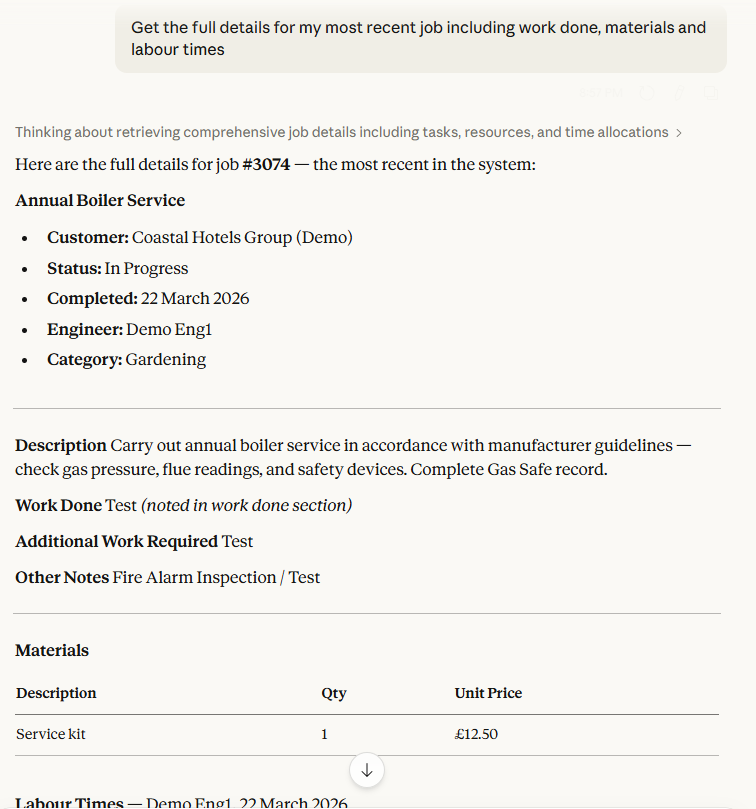
Claude AI connector showing a question about job details including work done, materials and labour times
"Get the full details for my most recent job including work done, materials and labour times"
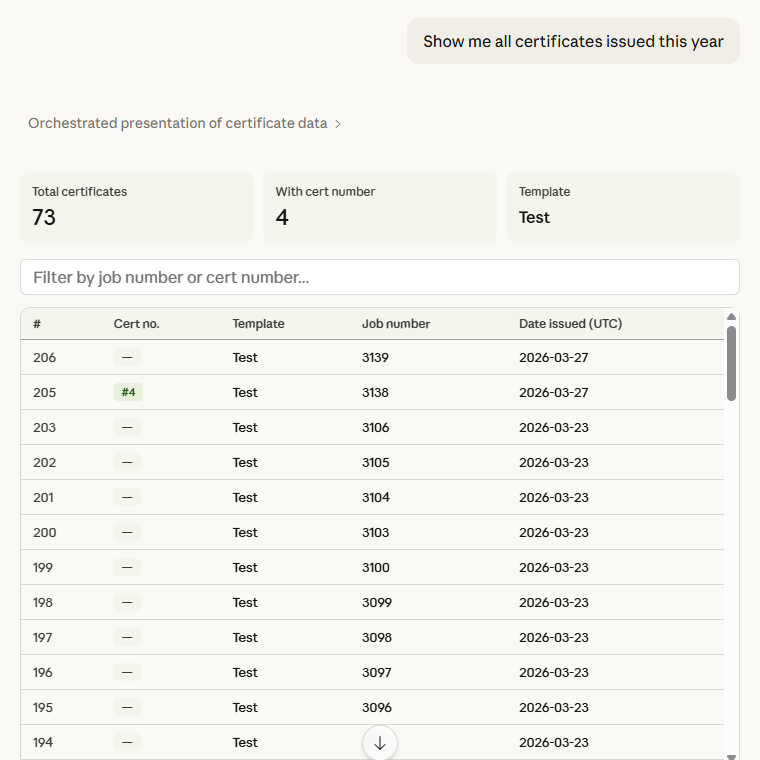
Claude AI connector listing all compliance certificates issued this year from field service data
"Show me all certificates issued this year"
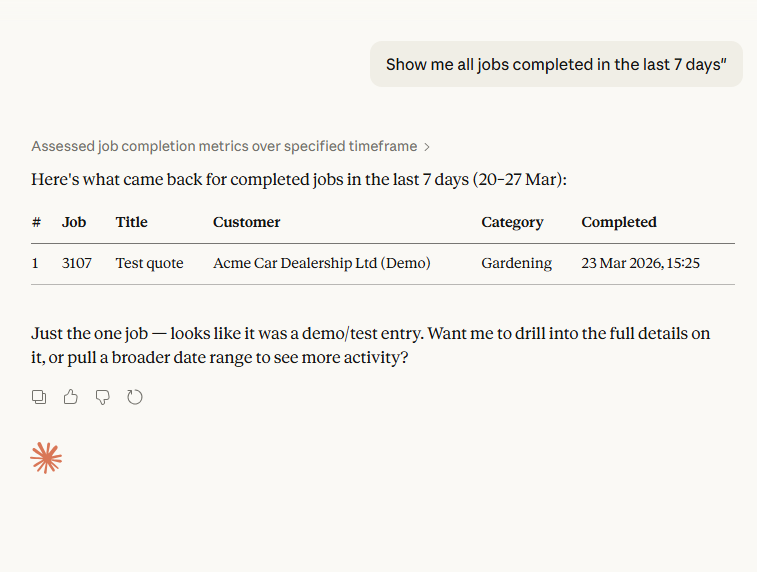
AI powered field service dashboard showing Claude returning a list of recently completed jobs from Field Ascend
"Show me all jobs completed in the last 7 days"

Conversations with Your Data

Whether you're an operations manager checking contract compliance, a business owner reviewing the week's performance, or an admin preparing a customer report — the AI Connector turns complex queries into simple conversations. This is an AI-connected field service platform in practice.

You
Which PPM contracts are due for renewal in the next 90 days?
Claude
search_ppm_contracts You have 4 contracts expiring before June: Whitworth Hospital (142 assets, monthly visits), Regent House (68 assets, quarterly), Park View School (23 assets, bi-annual), and Metro Business Centre (95 assets, monthly). The Whitworth Hospital contract has the highest annual value. Shall I pull the completion rates for any of these?
You
Show me all equipment at the Birmingham Central site that hasn't been serviced in the last 6 months.
Claude
get_site_details search_equipment Birmingham Central (Site #312) has 47 pieces of equipment registered. Of those, 8 items haven't been serviced since September 2025: 3 air handling units, 2 emergency lighting panels, 2 fire dampers, and 1 chiller unit. The chiller (Daikin EWAD-B, Serial #DK-9844) is the most overdue — last service was 11 months ago.
You
How many jobs did we complete last week, and what was the split by status?
Claude
search_jobs Last week (17–23 March) you completed 34 jobs. Breakdown: 28 marked "Complete", 4 "Invoiced", and 2 "Requires Follow-Up". The busiest day was Wednesday with 9 completions. Would you like the detail for the follow-up jobs?

12 Read-Only Tools at Claude's Fingertips

When you ask Claude a question, it selects the right tool automatically. Every tool is read-only — the AI can query your data but physically cannot modify it. These tools power the data insights via the Claude connector that make Field Ascend the UK's most capable AI-connected field service platform.

🧠

get_context

Loads your tenant's statuses, job types, equipment categories, and business glossary so Claude understands your setup.

🔍

search_jobs

Search and filter jobs by customer, site, engineer, status, date range, or free text.

📋

get_job_details

Full job detail: work done notes, materials used, labour times, equipment serviced, and certificates.

🏭

search_equipment

Search equipment by site, customer, type, or serial number across your entire asset register.

⚙️

get_equipment_details

Equipment detail with custom fields, service history, defect records, and linked certificates.

👥

search_customers

Search customers by name, email, phone, or account reference.

🏢

get_customer_details

Customer profile with all linked sites and recent job history.

📍

search_sites

Search sites by name, postcode, town, or parent customer.

🏗️

get_site_details

Site detail with registered equipment, recent jobs, and address information.

👷

list_engineers

List engineer names only — privacy-safe, no personal contact details exposed.

📜

search_certificates

Search compliance certificates by job, equipment, date range, or certificate type.

🔧

search_ppm_contracts

Search PPM contracts by customer, status, or contract reference.

Security First

We take data security seriously. The AI Connector is built with multiple layers of protection so you can use Claude-powered data querying capabilities without compromising your business data.

🔐 OAuth 2.1 + PKCE

Industry-standard authentication with Proof Key for Code Exchange. Your credentials never leave the secure login page. Access tokens expire after 1 hour with automatic rotation.

📖 Read-Only Database Replica

The AI connects to a physically separate read-only database replica. It is architecturally impossible for any AI query to modify, delete, or corrupt your data.

🔒 End-to-End HTTPS

All traffic is encrypted via Cloudflare with a 15-year origin certificate. Data is protected in transit from Claude to our servers and back.

🏢 Tenant Isolation

Every query is scoped to your tenant. There is no way for the AI to access another company's data — isolation is enforced at the database query level, not just the application layer.

🚫 No Data Stored by AI

Claude does not retain your business data after the conversation ends. Your job details, customer information, and equipment records are not used for AI training.

📊 Full Audit Logging

Every API request is logged with the endpoint accessed, response code, latency, and IP address. Full visibility into how your data is being queried.

Frequently Asked Questions

What is the Field Ascend AI Connector?

The AI Connector is a native integration between Field Ascend and Claude AI (by Anthropic). It uses the Model Context Protocol (MCP) to let you ask questions about your field service data — jobs, equipment, customers, sites, certificates, and PPM contracts — in plain English. All queries are read-only and secured with OAuth 2.1. It's the core of what makes Field Ascend an AI-connected field service platform.

Is my data safe when using AI with field service software?

Yes. The AI Connector uses a read-only database replica, meaning the AI physically cannot modify your data. Authentication uses OAuth 2.1 with PKCE, all traffic is encrypted end-to-end via HTTPS, and every query is scoped to your tenant. No data is stored by the AI after your session. See the privacy policy for full details.

What questions can I ask about my field service data?

Virtually anything that relates to your jobs, equipment, customers, sites, engineers, certificates, or PPM contracts. Examples: "Show me all jobs completed this week", "Which equipment at Site X is overdue for service?", "Get the full details for job #4521 including materials and labour times", or "List all certificates expiring in the next 30 days". Claude understands your business context and returns accurate answers from live data — true natural language reporting via the Claude connector without building a single report.

Does this work with ChatGPT or just Claude?

The MCP integration is native to Claude AI (web, desktop, and mobile). Field Ascend also has a public REST API at api.field-ascend.com that can be used with any AI assistant, integration platform (Zapier, Make, n8n), or custom tool. The API uses the same read-only endpoints and security model.

How do I connect Field Ascend to Claude?

Open Claude (web, desktop, or mobile), add a new MCP connection, and enter mcp.field-ascend.com/mcp. You'll be prompted to log in with your Field Ascend admin credentials via a secure OAuth flow. Once authenticated, Claude can immediately query your data. The whole process takes about 30 seconds.

What makes Field Ascend's AI Connector different from other integrations?

The AI Connector is a native Model Context Protocol (MCP) integration — not an API wrapper or chatbot. Claude connects directly to your live data via 12 read-only tools with OAuth 2.1 security. It works on Claude web, desktop, and mobile, giving you conversational access to jobs, equipment, customers, certificates, and PPM contracts without building reports or learning query languages.

Do I need technical knowledge to use the AI Connector?

No. If you can type a question in English, you can use it. There's no coding, no API configuration, and no dashboard setup required. You connect once via OAuth and then simply ask questions in Claude's chat interface. It's designed for operations managers, business owners, and admin staff — not developers.
Part of the Complete Field Ascend Platform

The AI Connector works alongside every feature in Field Ascend. The more data in your system, the more valuable your AI conversations become.

All Features AI Dashboard AI Automation AI Quote Generation PPM Scheduling Asset Tracking Mobile App CAFM Software FSM Software UK Blog

Ready to Talk to Your Data?

Start your free trial and connect Claude to your field service operations in under a minute.